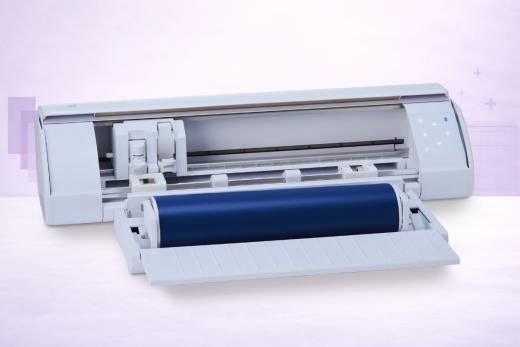
We don’t think it’s controversial to say that the Silhouette Cameo 5 is the best cutting machine Silhouette has ever made - and a true alternative to the Cricut Maker for serious crafters.
With 5,000 gf of cutting force, speeds up to 400mm/s, and completely subscription-free software, it delivers professional-grade performance that undercuts Cricut's flagship and offers some serious food for thought.
To be clear…
This isn't just another spec bump on the Cameo 4. Silhouette could have gotten lazy, but they’ve actually rebuilt the machine from the ground up with a new belt-driven architecture (SNA) that's noticeably quieter and more precise, along with a patented Intelligent Path Technology (IPT) that optimizes every cut path to reduce material stress.
Add in the Rotary Blade for unbacked fabric, matless cutting with any standard lined material, and a growing ecosystem of power tools (including a Heat Pen and Embossing Tools) - and what are we left with?
A machine that punches well above its price point.
We've been testing the Cameo 5 extensively - specifically the updated 5α revision released in September 2025. This guide contains everything you need to know about Silhouette’s brave new contender.
Note: If you're buying today, make sure you do get the Cameo 5α (Alpha) revision. It fixes a very annoying pinch roller durability issue on the original Cameo 5 and adds 4-point Print & Cut registration. We’ll cover this below.
Key Features of the Silhouette Cameo 5
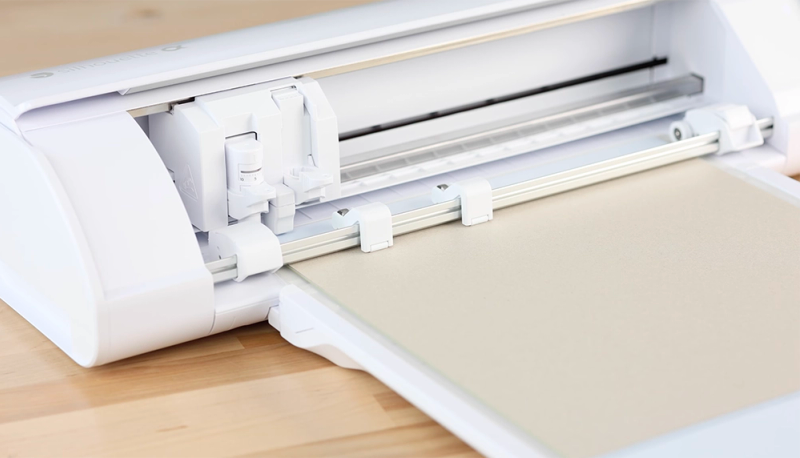
So what are we working with here?
- A super impressive 5,000 gf cutting force in Tool Holder 2 - the highest in any home/hobby cutter we’ve covered
- 400mm/s maximum cutting speed - roughly 133% faster than the Cameo 4
- Silhouette New Architecture (SNA) for quieter, smoother operation (50 dB)
- Intelligent Path Technology (IPT) which optimizes cut sequences for cleaner results
- Dual carriage: Tool Holder 1 (300 gf) + Tool Holder 2 (5,000 gf)
- Compatible with AutoBlade 2, Rotary Blade, Kraft Blade, Heat Pen, Embossing Tools, and more
- Matless cutting with any standard lined material - there is no proprietary materials required
- Built-in vinyl trimmer and auto cross-cutting
- One-Touch Repeat Job button (great for batch production)
- Optional Electrostatic Mat for delicate materials (tissue paper, vellum, thin cardstock)
- USB 2.0 and Bluetooth connectivity
- Available in 4 colors: Classic White, Matte Black, Matte Pink, Bianco Carrara (marble). Probably more coming soon.
- And it’s all powered by Silhouette Studio - totally free, no subscription, works fully offline
Three Technologies That Set the Cameo 5 Apart
Normally we are quite skeptical about whether an upgrade is truly worth it. Some previous Silhouette launches have been fairly low-key, with just minor adjustments to speed, or cosmetic lifting.
That’s not the case here…
The trusty Cameo has undergone a significant rethink:
Silhouette New Architecture (SNA)
The machine has received a complete mechanical redesign.
The new belt-driven system replaces the Cameo 4's gear-driven approach, and the difference is hard to miss. The carriage moves muuuch more smoothly, the machine runs quieter (around 50 dB, which is roughly conversation-level), and cut precision is improved across the board.
If the Cameo 4 ever frustrated you with noise or the occasional jerky carriage movement, the Cameo 5 addresses both issues head-on.
Intelligent Path Technology (IPT)
Sounds a bit complicated, but this is all about efficiency.
IPT is a patented algorithm that rethinks the order in which the machine makes its cuts. Instead of cutting shapes in the order you placed them in your design, IPT can analyze the entire layout and sequences cuts to maintain counter-pressure on the material at all times… which is actually VERY smart.
What does that mean for us?
Less material stress, fewer tears on thin media, and much cleaner cuts on intricate designs.
You can toggle IPT on and off in Silhouette Studio. I’ll be honest here: IPT can definitely increase total cutting time on complex layouts, which is all because it's prioritizing quality over raw speed.
For most projects, the trade-off is worth it. It’s nice ti have a choice, either way.
Electrostatic Mat
When we saw this, we thought it was the most interesting accessory Silhouette has introduced in years.
The Electrostatic Mat uses static electricity - powered by the machine itself - to hold thin and delicate materials flat… without adhesive.
No stickiness, no residue, no curling.
If you work with tissue paper, vellum, thin cardstock, or decoupage paper, this solves a real problem because you already know how fiddly it could be.
If we recall, the original Cameo 5 supported materials up to 0.2mm on the Electrostatic Mat.
Well, the updated 5α revision bumped that to 0.5mm - over double the thickness and a solid improvement. Keep in mind, however, the mat is sold separately. It comes in Classic White, Matte Black, and Matte Pink.
What We Love About the Cameo 5
Cutting Power That Exceeds the Cricut Maker
At 5,000 gf in Tool Holder 2, the Cameo 5 has more cutting force than any home/hobby cutter we've tested - and yes, that is including the Cricut Maker’s 4,000 gf.
Paired with the 3mm Kraft Blade, it handles balsa wood, heavy chipboard, thick craft foam, and leather in single passes that would require multiple attempts on weaker machines.
Whether you actually need this cutting power will, in our opinion, sway your choice on whether to go with Cricut or Silhouette.
Of course, for everyday materials like vinyl and cardstock, the AutoBlade 2 in Tool Holder 1 (300 gf) is more than enough - and it auto-adjusts to your material, so there's no manual blade fiddling.
Always a plus.
Speed That Matters for Batch Work
400mm/s is (if our maths are correct!) 133% faster than the Cameo 4 and measurably faster than any current Cricut machine.
Honestly, if you're cutting one or two designs for personal projects, you probably won't notice the difference. A few seconds saved here or there are no biggie.
But if you're running a small business producing vinyl decals, stickers, or HTV transfers in volume and on clockwork, you absolutely will notice.
The speed adds up quickly in long batch jobs.
The One-Touch Repeat Job button makes batch production even smoother - hit the button, load new material, and the machine repeats the last job without touching your computer. Very useful.
No Material Lock-In
This is one of our favorite things about the Silhouette ecosystem, so you probably know what’;s coming.
Matless cutting works with any standard backed or lined material - any brand of adhesive vinyl, any HTV, any sticker sheet.
You're not locked into buying Smart Materials at a premium. You can go with whatever vinyl you prefer, from Oracal 651 to Siser EasyWeed to budget rolls from Amazon.
The included roll feeder handles material up to 16 feet long.
Subscription-Free Software That Works Offline
Silhouette Studio is completely free in its basic edition, requires no internet connection, and never asks for a monthly subscription.
Nothing has changed here since the Cameo 4, but it’s important to distinguish between the software choices for anybody who can’t decide between Silhouette vs Cricut.
For crafters who've grown frustrated with Cricut Design Space's cloud dependency and Cricut Access subscription nudges… there IS a good alternative.
The software is pretty powerful, too - particularly at the Designer Edition tier (for a $49.99 one-time upgrade).
This boosted options adds SVG import, rhinestone tools, and a feature set that approaches Adobe Illustrator for craft-specific work.
Rotary Blade Opens Up Fabric Cutting
With the Rotary Blade (sold separately, fits in Tool Holder 2), the Cameo 5 cuts cotton, felt, leather, wool, and crepe paper without any stabilizer or backing.
This puts it on par with the Cricut Maker for fabric versatility - a capability that no Cricut Explore machine can match at any price.
Quilters and sewists should definitely take note.
What Could Be Better
Is the machine perfect?
No, but some of the biggest issues have been mitigated with the Alpha release…
Pinch Roller Issues on Pre-Alpha Units
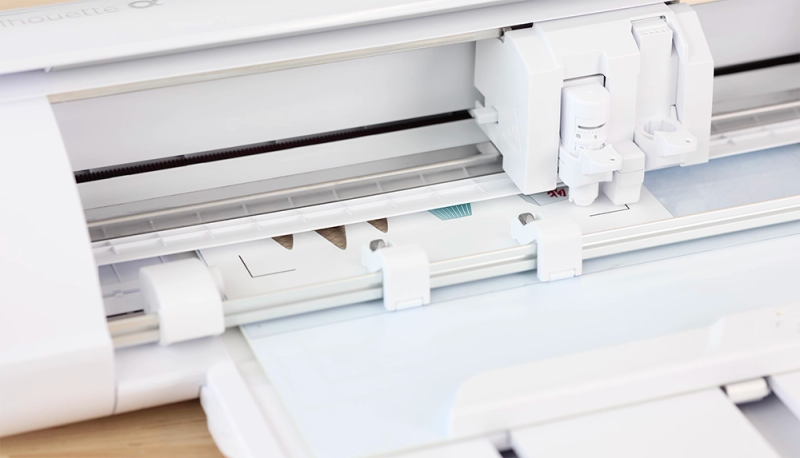
The original Cameo 5 had a well-documented problem with pinch rollers cracking and breaking. We’re sure you heard about it!
In fact, according to Silhouette School, this was the primary reason for the 5α revision released in September 2025. And it makes sense. Silhouette has never previously experimented with Alpha releases mid-series.
Basically, if you're buying a Cameo 5 today, make sure you're getting the 5α version.
Some retailers are probably still hoarding whole old stock…
Before You Buy
SVG Import Costs Extra
Well, yes, herer’s the catch with Silhouette Studio's "free" software: the basic edition doesn't support SVG file import. You're limited to Silhouette's own .studio3 format and basic image tracing.
For most crafters - especially anyone downloading free SVGs or purchasing designs from Etsy - SVG support is pretty damn near essential.
So inevitably that means spending $49.99 on the Designer Edition upgrade.
Cricut Design Space imports SVGs for free. It's not a dealbreaker, but it's a real cost to factor into your budget. You’re probably going to want it.
The Dual Carriage Doesn't Work Simultaneously
Like the Cameo 4, the Cameo 5's dual carriage runs tools sequentially, not simultaneously.
What does that mean?
Well, let’s say you’re doing a sketch-and-cut project. The machine will complete all cutting first, and only then switches to the pen (or vice versa). You can't sketch and cut in a single pass.
For most of the stuff we work on, this is a minor inconvenience, but if you do a lot of multi-tool projects, the extra time adds up.
The Roll Feeder Is Detachable Now
The Cameo 4 had a built-in roll feeder - always there when you needed it.
The Cameo 5's roll feeder is actually an attachable accessory: so you set it up when you need it, store it when you don't.
Silhouette says the new design is sturdier, and we'd agree it's an improvement over the Cameo 4's somewhat rickety built-in version. But it still isn't as rock-solid as you'd want for very long continuous cuts.
For anything under 4–5 feet, it's perfectly fine.
Anything longer? This is a bit of a downgrade in our opinion.
Smaller Community Than Cricut
Obviously, nothing to do with the Cameo 5 but a critical decision for which ecosystem you choose.
Cricut has 8 million+ community members, a massive YouTube tutorial ecosystem, and over 1.5 million ready-made designs in Design Space.
Silhouette's community is smaller by a massive margin. It has fewer beginner tutorials, fewer project templates, and fewer people to ask when you're stuck.
Thankfully, the numbers aren’t everything.
The Silhouette community that does exist - especially Silhouette School and the various Facebook groups - is excellent and deeply knowledgeable.
Just be prepared that if you're a complete beginner who relies heavily on guided tutorials and pre-made designs, Cricut's ecosystem is larger. There’s no getting round it.
Silhouette Cameo 5 vs Cameo 4
If you own the Cameo 4, the upgrade question is straightforward. Here's how they compare side by side:
The cutting force is identical, but the Cameo 5 is faster, quieter, and has a longer list of capabilities.
The features that matter most are actually all-new: IPT (better cut quality on intricate designs with the Cameo 5), the Electrostatic Mat (if you work with delicate materials), and the expanded power tool lineup including the Heat Pen and Embossing Tools.
If your Cameo 4 is working well and you don't need the extra speed or new tools, it's still a great machine.
But if you're buying new, the Cameo 5 is the obvious winner.
Silhouette Cameo 5 vs Cricut Maker 4
This is the comparison most people want to see. Both are flagship-tier machines aimed at serious crafters and small businesses. Here's the head-to-head:
The Cameo 5 wins on raw power (5,000 gf vs 4,000 gf), speed (400mm/s vs 300mm/s), usually price ($70 less), material freedom (no proprietary Smart Materials required), and software independence (no subscription, fully offline).
The Maker wins on total material count (300+ vs 100+), number of compatible tools (13+ vs 10+), and the sheer size of Cricut's community and content library. Already well established.
Our take: if you value cutting power, speed, software freedom, and open materials, the Cameo 5 is the better buy. BUT If you need the widest possible range of specialized tools, or you're already invested in Cricut's ecosystem with existing blades and materials, the Maker still delivers. Both are excellent machines - you won't regret either choice.
What's in the Box
- Silhouette Cameo 5 machine
- AutoBlade 2 (pre-installed in Tool Holder 1)
- 12 × 12 in cutting mat (standard tack)
- Attachable Roll Feeder
- USB cable
- Power adapter with 90-degree connector
- Getting Started guide
- 100 exclusive designs (access provided during registration)
- 1-month free trial subscription to Silhouette Design Store
Unlike the Cameo 4, the Cameo 5 does not include blade adapters for older Silhouette tools in the box.
If you need backward compatibility with Cameo 3-era blades, adapters must be purchased separately.
Cameo 5 vs Cameo 5 Alpha (5α)
The confusing part for many readers…
The Cameo 5α, released September 2025, is a hardware revision - not a new product. All core specs (force, speed, dimensions, tool compatibility) are identical.
But the Alpha is considered more reliable,
- Redesigned pinch rollers - for this reason. The original Cameo 5's most common complaint, fixed with more durable rollers and easier adjustment
- 4-point Print & Cut registration (up from 3-point) - adds vertical and horizontal correction for more accurate results, especially on slightly distorted prints
- Improved Electrostatic Mat capacity - supports materials up to 0.5mm (up from 0.2mm)
- Fast Sketch Mode - pen and marker drawing at higher speeds
- Emergency stop button added
The 5α is what Silhouette currently sells on their website. If you're buying new today, you'll almost certainly get the 5α - but double-check if purchasing from third-party retailers.
Which Version Should You Buy?
Compatible Tools
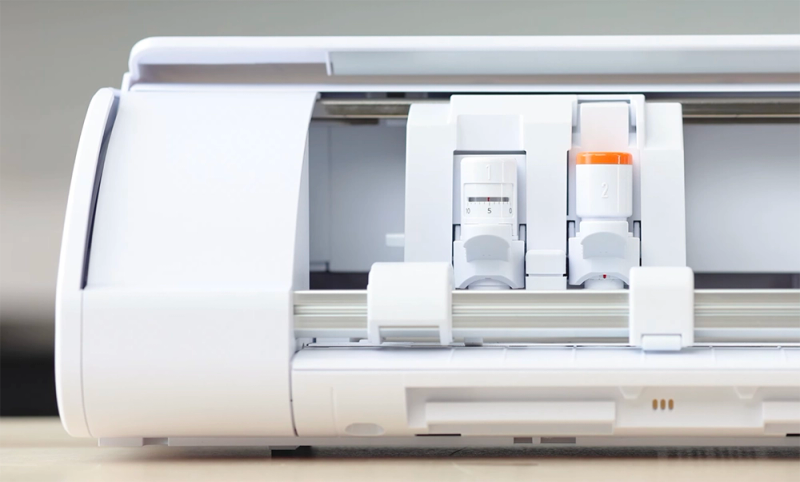
The Cameo 5's dual carriage supports a wide range of tools across two holders with different force capacities:
Tool Holder 1 (Type B - 300 gf)
- AutoBlade 2 (included) - this is the auto-adjusting blade for vinyl, paper, cardstock, HTV and so on
- 1mm Manual/Ratchet Blade (sold separately)
- 2mm Manual/Ratchet Blade (sold separately)
- 2mm Kraft Blade (sold separately) - chipboard, craft foam, leatherette
Tool Holder 2 (Type C - 5,000 gf)
- Rotary Blade (sold separately) - for unbacked fabric, felt, leather, wool, crepe paper
- 3mm Kraft Blade (sold separately) - for heavier materials like chipboard, balsa wood, thick craft foam
- Punch Tool (sold separately) - creates weeding points in vinyl/HTV
Power Tools (Cameo 5 Exclusive)
- Heat Pen ($39.99) - applies foil via heat transfer on faux leather and cardstock
- Embossing Tools - emboss and deboss embossable foil and cardstock
- Tool 2 Pen Holder - enables dual-pen or sketch-and-cut workflows
Colors and Sizes
The Cameo 5 ships in four colors: Classic White, Matte Black, Matte Pink, and the particularly striking Bianco Carrara (a marble pattern).
At the time of writing, anyway. We often find new colors rolled out through the product life cycle and various special editions.
All four are available in both the original Cameo 5 and the 5α revision.
The standard Cameo 5 has a 12-inch cutting width. Silhouette also offers the Cameo 5 Plus (15-inch width) and Cameo 5 Pro (24-inch width) for crafters who need larger cutting areas. Both Plus and Pro share the same technologies - SNA, IPT, Electrostatic Mat support - with the same 5,000 gf cutting force.
Is the Silhouette Cameo 5 Worth Buying?
Absolutely - with one caveat.
The Cameo 5 is the most powerful and fastest home cutting machine we've tested. Pitched at a great price with no subscription required and open-material matless cutting, it's hard to argue against it being the best value in premium cutters right now.
It matches the Cricut Maker on fabric cutting, exceeds it on raw force and speed, costs (roughly) $70 less, and doesn't lock you into proprietary materials.
The caveat: get the 5α revision.
The original Cameo 5's pinch roller issues were a big boo-boo, and there’s a reason Silhouette thought it necessary to release a mid-cycle fix for them.
The 5α fixes those issues along with adding 4-point Print & Cut and an emergency stop button.
If you're a Cricut user considering a switch, we’d say to expect two adjustments: learning Silhouette Studio (it’s more powerful but less beginner-friendly than Design Space) and budgeting $49.99 for the Designer Edition if you need SVG import.
The smaller community means fewer tutorials, but the resources that do exist - especially Silhouette School's 3,000+ free guides - are outstanding.
For small business owners, vinyl crafters, and anyone who values cutting performance and material freedom over ecosystem hand-holding, the Cameo 5 is a very impressive cutter. Silhouette’s best to date.
Still not sure which cutter is right for you? Check out our Reviews section for detailed analysis of all the top-selling vinyl cutting machines.
Pros & Cons
What We Love
- ✓5,000 gf cutting force in Tool Holder 2 - highest in class
- ✓400mm/s cutting speed - 133% faster than Cameo 4
- ✓No material lock-in for matless cutting
- ✓Subscription-free Silhouette Studio with offline capability
- ✓Rotary Blade for unbacked fabric cutting
Watch Out For
- ✗Pinch roller durability issues on original Cameo 5
- ✗Silhouette Studio has a big learning curve
- ✗Dual carriage cannot operate simultaneously
- ✗Smaller community and content library than Cricut
Our Verdict
Exceptional
The Silhouette Cameo 5 is one of the most powerful and fastest home cutters on the market - serving up 5,000 gf of force and 400mm/s speed in a package that surpasses the Cricut Maker on specs alone. The new belt-driven SNA architecture is noticeably quieter, and Intelligent Path Technology delivers cleaner cuts on intricate designs. The main trade-offs are Silhouette Studio's steeper learning curve and the need to buy the 5α revision to avoid the original's pinch roller problems.
Specifications
| Spec | Detail |
|---|---|
| Colors | Classic White, Matte Black, Matte Pink, Bianco Carrara (marble pattern) |
| Connectivity | USB 2.0 (Full-speed) + Bluetooth |
| Cutting Force | Tool Holder 1: 300 gf (±20 gf); Tool Holder 2: 5,000 gf (5 kgf) |
| Dimensions | 22.28 × 6.94 × 4.89 in (56.6 × 17.6 × 12.4 cm) |
| Fabric Cutting | Yes |
| Material Clearance | 3 mm (118.11 mils) |
| Materials | 100+ |
| Max Cut Size (Mat) | 12 × 24 in (30.5 × 61 cm) |
| Max Cut Size (Matless) | 11.6 in × 16 ft (29.5 cm × 4.88 m) with lined material using Roll Feeder |
| Max Cut Speed | 400 mm/s (15.7 in/s) |
| Print Then Cut | Yes |
| Smart Materials | No |
| Software | Silhouette Studio (free basic edition; Designer Edition $49.99; Designer Edition Plus $74.99; Business Edition $99.99). Also: Silhouette Go (mobile app), Silhouette Web (browser-based, optional). |
| Weight | 11 lbs 2.1 oz (5.05 kg) |